Important Preset Information
The Aikobots preset is the default and highly recommended as it's the most accessible for users and it automatically updates in the background whenever browsers are closed. Please ensure your bots are compatible with this preset.
If you'd rather write your own preset instructions, that's fine too! The Aikobots preset is just a list of outlets and can be overridden with lorebook entries. Talk to Aiko about how to distribute it and make it fit within the Aikobots outlets layout.
Before You Start
- Once you've figured out your bot's name, ping Aiko in #botmaking-and-prompting in the Aikobots Discord server so that she can make a notification role and add the bot to your self-assign-roles card for your fans. Choose an emoji that has not already been taken, for your bot, and for yourself (if you are a new Aikobots botmaker).
- Sign up for a release slot in the Aikobots Discord server. Check the pins in #botmaking-and-prompting for the latest bot queue. Remember that we are limiting releases to TEN a month across ALL makers (except Aiko). For fairness, only one bot per maker per month.
Naming Convention (CRITICAL)
This is our naming standard convention:
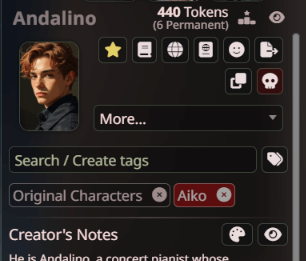
- Character Card: Andalino
- Lorebook: Z-aiko-Andalino. The leading Z MUST be capitalized. DO NOT capitalize your username!
- Roll Call: Andalino Madrigal
Please try to avoid using emoji in the bot names. While it is doable, Aiko does not recommend it and would prefer if you could avoid it. Remember that the bot's name is sent to the AI as well during roleplay.
Step 1: Create Your Character
Profile Picture
Get a profile picture (PNG format recommended)
- WEBP format will not work! Use a WEBP→PNG image converter to get a workable image for upload.
- JPEG/JPG works but PNG is preferred
- Keep your file size under 300kb as large files can cause issues. Use free converters if needed: TinyPNG and TinyJPG are good free options.
Character Creation Steps
- In Silly Tavern, go to the Characters tab → View All Characters → Create
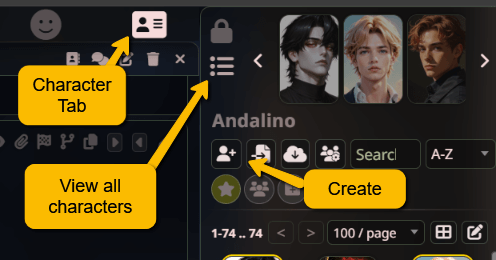
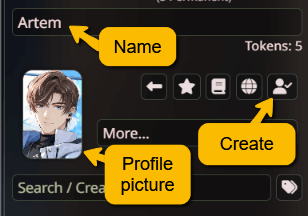
- Enter the name and upload your profile picture. (Remember naming conventions and picture requirements from "Before You Start!") Click Create.
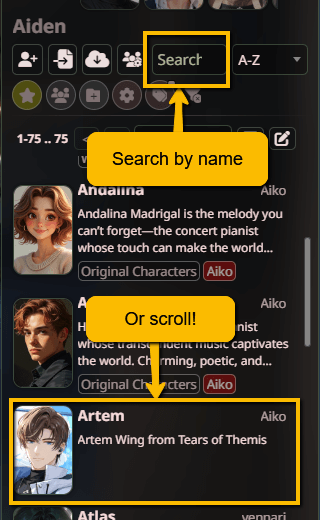
- Back in the main characters list, find and click on your newly created character. You can search or scroll.
- Click to open Advanced Definitions.
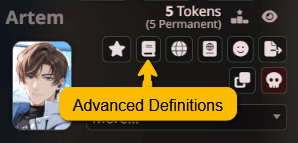
- Expand Creator's Metadata (this will let you make the Creator's Note!). Add your character information. Click to make the text entry boxes bigger. You can use Markdown (#, **, etc) in these fields.
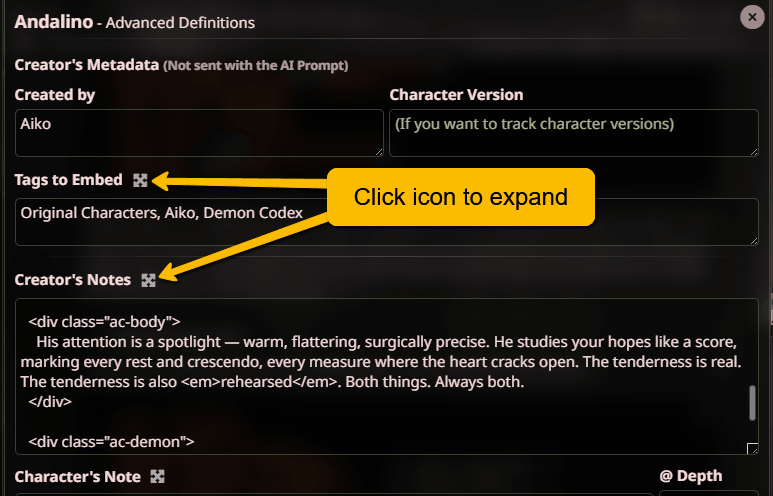
- Important: Put your name in Created By.
- Put these tags into the "tags to import" section of your bot:
- Original Characters for your original characters
- If the bot is a fan bot, instead of the above, put down the fandom that the character comes from, eg. Love and Deepspace or Fourth Wing
- Your bot maker name. For example, Aiko on all Aikobots. This creates a tag and is different from the "Created By" field above.
- The Creator's Note is where you can communicate with your bot's users within Aikobots. If you want to use CSS, the only fonts allowed are Google Fonts. Use the @import method. Other sources are not allowed. Minimum information to include:
- Introduction/Blurb for your bot
- Engine and temperature recommendations. You can bullet or use ✅🆗⭕❌.
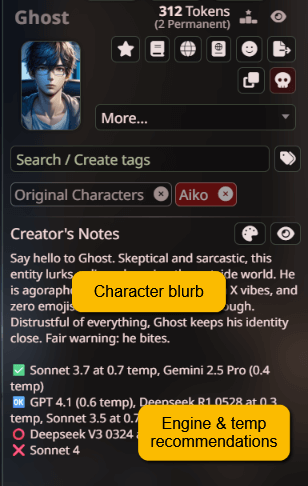
- Click again to close the advanced window. Then click to toggle between Creator's Note and Description/First Line.
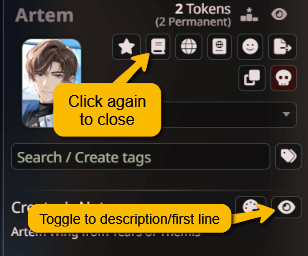
- Add your character's opening message. This is the starter or RP beginning prompt.
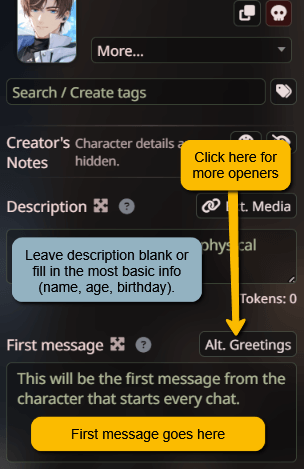
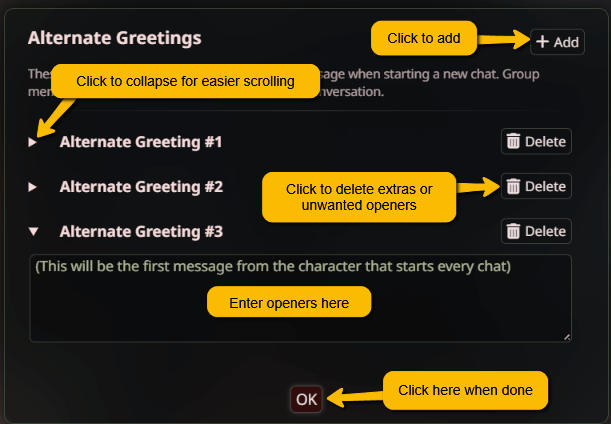
- Optionally, click Alt Greetings to add more opening messages. Users appreciate a variety of prompts and it gives users a choice of how they might want to play with your character as they get to know them.
Step 2: Create the Character Lorebook
Set Up Lorebook
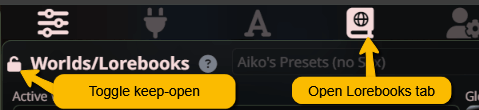
- Open the Lorebooks tab with the icon. (You can click to keep the drawer open.)
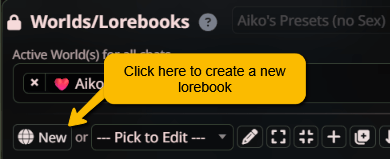
- Click New to create a new lorebook.
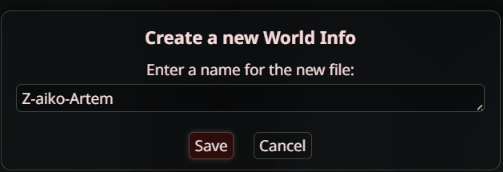
- Name your lorebook: Z-username-charactername
- Example: Z-aiko-Artem if your username is "aiko" and character is "Artem".
- This naming convention is the required standard for secured lorebooks.
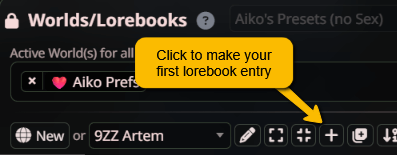
- Click the icon to create your first lorebook entry.
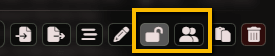
- Make your lorebook a secure lorebook by clicking the lock icon. If you are sharing your lorebook with another maker, click the share icon.
Link Lorebook
Click the globe icon to open the lorebook link dialog/popup.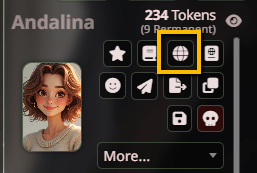
Select the lorebooks that you want to link. You can link as many as you want, but they MUST be secure lorebooks. Do not link the Aikobots template lorebooks here--contact Aikobots if you want to change the lorebooks that are linked.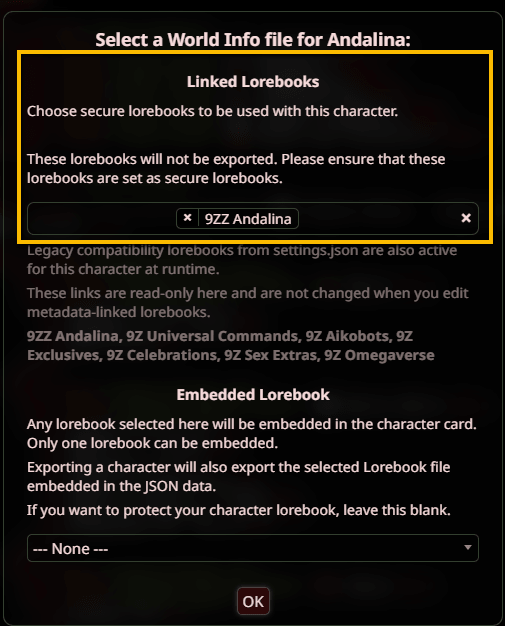
These are the automatic lorebooks that are pre-linked for _all_ bots:
- 9Z Universal Commands - Open and readable lorebook (available in your lorebooks as Universal Commands) that contains all the 🌍 Universal Commands.
These are the lorebooks that are linked to all globally-pushed bots (contact Aiko to opt out of any of these):
- 9Z Exclusives - Aikobots exclusive commands that are not published publicly in 9Z Universal Commands. These are the 🎗️ Aikobots Exclusive Commands.
- 9Z Celebrations - Achievements (random generator)
- 9Z Omegaverse - Enables the Omegaverse for any bot
Essential Lorebook Entries
Create at least these entries with the following settings:
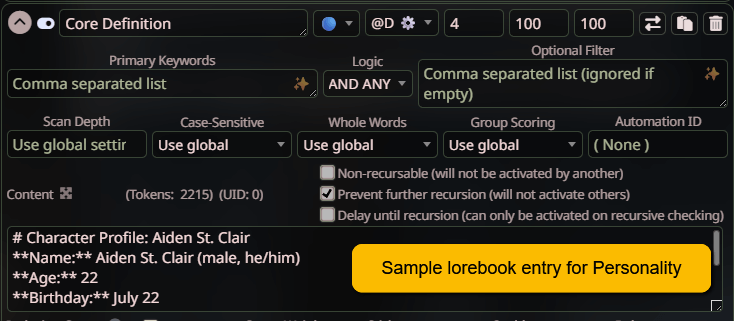
- Personality: Strategy: 🔵 (constant), Position: @D⚙️, Depth: 4
- Backstory (or History): Strategy: 🔗 (vectorized), Position: ↓AN
Lorebook Entry Positioning
For Personality/Essential Information:
- Strategy: 🔵 (constant)
- Position: @D⚙️ (only for CRUCIAL information)
- Depth: NEVER go below 4 (causes prompt leakage where engines will spit out your lorebook coding)
- Check the box to prevent further recursion
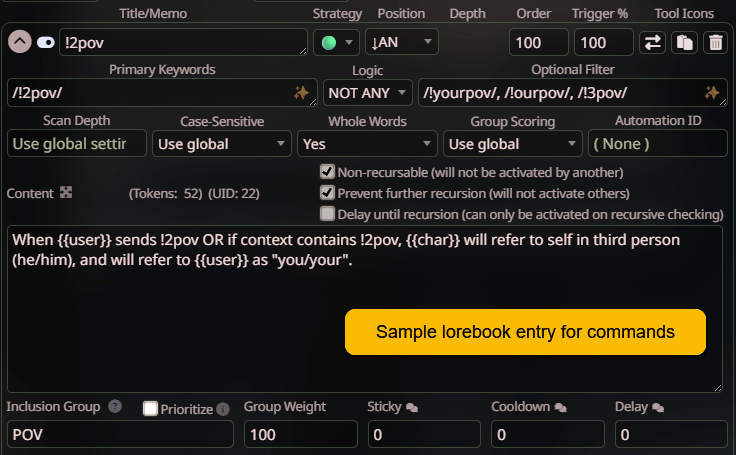
For Commands and important (but not fundamental) entries:
- Strategy: 🟢 (keywords)
- Position: @D⚙️ or ↓AN depending on just how crucial this is
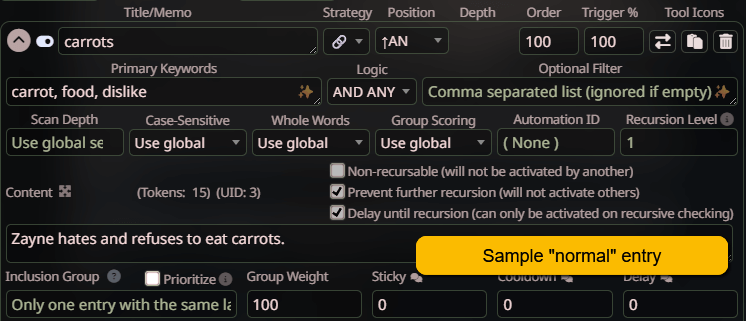
For most bot entries:
- Strategy: 🔗 (vectorized), but 🟢 (keywords) for very short/targeted entries with very specific keywords
- Position: ↑AN
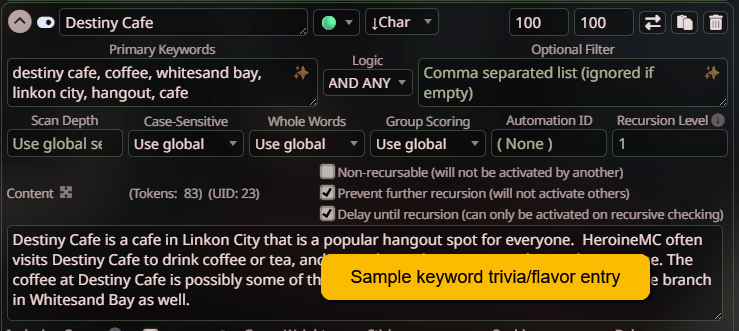
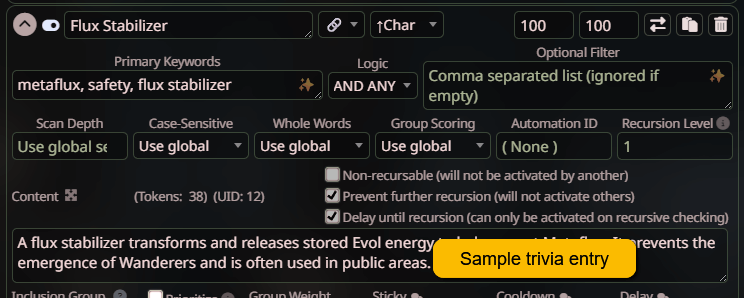
For Flavor or Trivia (it's OK if bot forgets or ignores it but it's nice to have):
- Strategy: 🔗 (vectorized), but 🟢 (keywords) for very short/targeted entries with very specific keywords
- Position: ↓Char or ↑Char (depends on how important it is)
For Memories:
- Strategy: 🔗 (vectorized)
- Position: ↑Char
Privacy Considerations
To keep your bot programming private:
- Define all character details exclusively in the lorebook
- Avoid using standard character fields as anyone can click "Copy" or "Export" to take your character otherwise.
Aiko's Tips and Recommendations
- Do not put headers in the Title/Memo. That information does not go to the AI! It is only for you, the human, to find entries in your lorebook easily.
- After a lot of testing, Aiko recommends that all constant entries (🔵) with the same Position setting should be arranged in one long entry instead of split across many entries. This keeps relevant instructions together and in the correct sequence reliably. However, you can also use Order for this.
- All memories should be vectorized (🔗) and ↑Char. The exception would be if this is a truly fundamental life-changing memory, in which case go no lower than ↑AN.
- Depth, if available, must NEVER be smaller than 4. Doing this will cause prompt leakage (in which the bot will spew out a large part or all of your coding.)
OOC Personalities
You are more than welcome to invoke Mama Peach (trigger: !mamapeach) or Ed (trigger: !edooc) for your OOC personality if you want. Just include either's OOC trigger/preference in your bot definition.
Universal Commands
All bots will automatically be given the Universal Commands and Aikobots Exclusives lorebooks. These commands can be used on all bots by default; no additional lorebooks or entries necessary. For the list of commands, visit the Commands page.
- The Universal Commands (🌍) and Site Exclusive Commands (🎗️) are opt-out. If you want to replace/rewrite any of the commands, please contact Aiko for inclusion group information.
- Do not modify the Universal Commands lorebook - any changes will be overwritten with updates. Make a copy and prioritize it in the inclusion group if you want to customize the commands.
- Want to opt out of any/all 🎗️ commands? Can't find the inclusion group for a 🌍 command? Let Aiko know!
Statboxes
If your bots use statboxes and you have options for display/hide, PLEASE follow the conventions set in Universal Commands. This way users don't have to make many different preferences entries.
- !statbox to display statbox always.
- !statdrawer to keep the statbox in a clickable drawer.
- By default statboxes should be hidden, so there is no hide command.
Celebrations
All bots will automatically be given the Celebrations lorebook; no additional lorebooks or entries necessary.
- This is the Aikobots-exclusive lorebook that powers the Celebrations users get.
- As of July 15, 2025, there are 40 Celebrations. Users are doing a "treasure hunt" (see the Celebrations Tracker thread in the Aikobots fanzone.)
- Want to opt out of Celebrations? Let Aiko know!
Omegaverse
By default bots have access to the Omegaverse. If you want to opt your bot out, please let Aiko know ASAP.
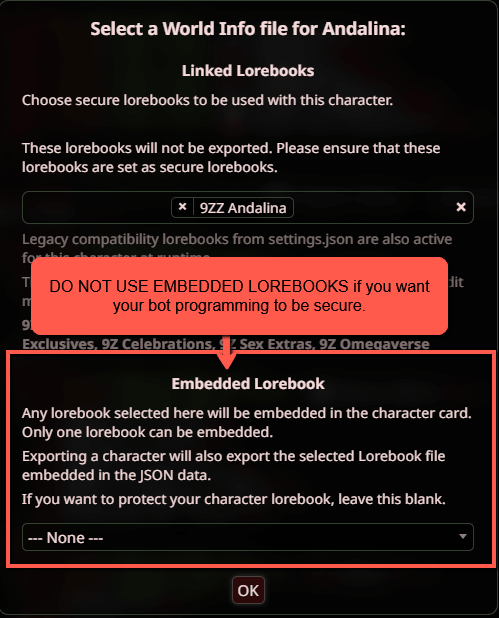
Important: Do Not Embed Lorebooks
- Most SillyTavern how-tos tell you to embed your lorebook, but embedding allows others to export your character and use it elsewhere without permission.
- On Aikobots, link your secure lorebooks; do not embed them. Aiko is not responsible for botmaker issues related to embedded lorebooks.
Bot Rating
Here is the Discord thread on the Aikobots Bot Rating System. It shows you how to evaluate your bots with the help of an AI (Gemini, Claude, or GPT are the best at this).
Step 3: Testing Phase
If you are building the bot on your own Silly Tavern install:
MAKE SURE you do not embed the lorebook, or make sure that you have un-embedded it properly. Aiko WILL NOT TEST THIS!
Beta Testing
Reach out to @Beta Testers on the Aikobots Discord server. Some folks LOVE testing bots!
- Post in your fanzone and tag the Beta Testers role to request beta testers.
- Make sure to provide clear instructions on how to test your bot.
- Once you have your list of beta testers, let Aiko know and she will do the beta push.
What to Test
- Personality: Does your character behave as expected?
- Keyword recognition: Do your 🟢 and 🔗 entries trigger correctly?
- General lore: Does your character reference their knowledge appropriately?
Review Token Efficiency
Keeping tokens low helps users - every token costs credits!
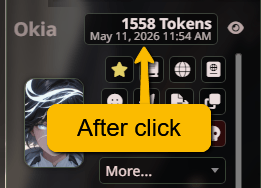
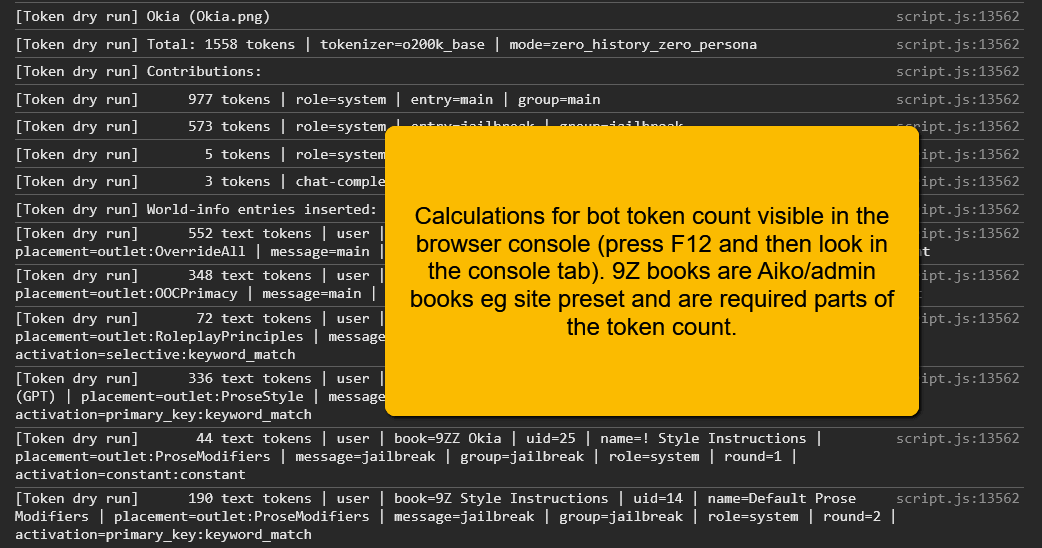
- Under 5k tokens: Amazing!
- Under 10k tokens: Great!
- Approaching 15k: A bit more than average. Review your entries for:
- Too many blue entries?
- Chain triggers too sensitive?
- Keywords too broad/generic?
- Over 20k: If your bot has this many tokens so be it, but make sure users are aware of how many tokens your bot uses so that no one has any unpleasant surprises when it comes to usage bills.
Remember, the more tokens your bot uses, the more credits it costs to talk to it.
Step 4: Final Push to Server
Once everything is working well, confirm to Aiko before your assigned push date that your bot is OK to push.
That's it! 🎉 Congratulations, you've successfully created a bot!
Bot Promotion
You are highly encouraged to post about your upcoming bots in your fan zone and/or the bot promotion channel! We will announce when a new botmaker joins the Aikobots ranks.
Roll Call
Aiko adds the bots to Roll Call and also to Okia (our recommender/analysis bot). Getting her this information helps users find your bots faster.
Starting Tokens Count
Before doing this, you need to have given Aiko your bot's lorebook so that she can link it to your character. Check if your character has ✅charlore and 🔗lorebook next to it in the release queue. If you don't, please review the "Before You Start" section at the very beginning of this guide.
Assuming that you are good with the first paragraph, here's how to get the starting tokens count:
- Use a blank persona (mine is "Aikotester").
- Ensure that there are no lorebooks attached. No preferences or chat lorebooks or memories. No lorebooks attached to your "blank" persona.
- Switch to your favorite engine to be used with the bot. (This part is important because individual engines have different instructions.)
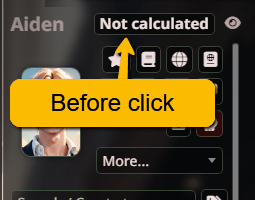
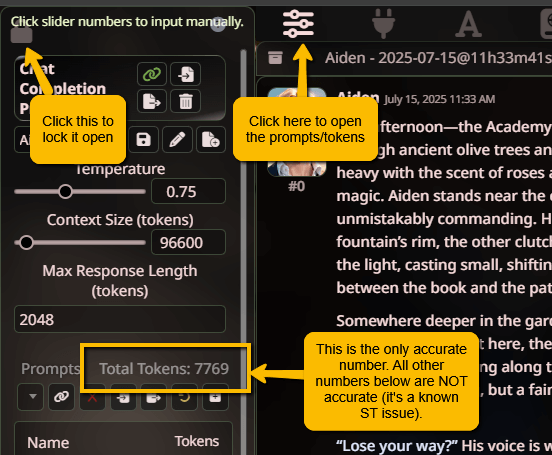
- Start a new chat with your bot. Don't say anything. Just create a new chat and then wait while the tokens calculate. After about 30 seconds, you will have an initial token estimate. The "Total Tokens" from this is the number you should report to Aiko as your bot's starting tokens.
Recommended Engines
Make sure you give Aiko the list of recommended engines and use the ✅🆗⭕❌ conventions. It makes her life a little easier not needing to look them up.
Roll Call Blurb
Make a blurb for roll call so that people can see what your bots are about without having to click into each character card! This Discord link has instructions on how.
Recommender/Deepdive Entries for Okia
-
To make a recommendation entry that will be used for Okia's !recommmend function:
- Download your character's lorebook JSON. If you have a world, also download your world lorebook JSON. (Don't know what this means? Ask in the #help-911 Discord channel!)
- Go to Okia and start a new chat. You can hide or delete Okia's starting message.
- Click the magic wand menu (🪄) and then click "Attach A File". Attach your character's lorebook JSON (and your world lorebook JSON, if you have one).
- Send this message: !recinfo botname (botmaker: yourname). Make sure you put your name in. For example, Aiko would send !recinfo Aiden (botmaker: Aiko).
- Send both the copy-paste entry AND the keywords list to Aiko so that she can enter them into Okia. (Please review/rewrite the entry if it isn't good, but please don't make it too long.)
-
To make a deepdive entry that will be used for Okia's !deepdive function:
- Download your character's lorebook JSON. If you have a world, also download your world lorebook JSON. (Don't know what this means? Ask in the #help-911 Discord channel!)
- Go to Okia and start a new chat. You can hide or delete Okia's starting message.
- Click the magic wand menu (🪄) and then click "Attach A File". Attach your character's lorebook JSON (and your world lorebook JSON, if you have one).
- Send this message: !charinfo botname (botmaker: yourname, world: name).
- Make sure you put your name in. For example, Aiko would send !charinfo Pixi (botmaker: Aiko, world: Vanterra).
- If your bot is modern-world or has its own standalone world (not a lorebook with a world), you can put in world: n/a. For example, Aiko would send !charinfo Ghost (botmaker: Aiko, world: n/a)
- Send the copy-paste entry to Aiko so that she can enter them into Okia. (You can review/rewrite the entry if it isn't good, but please don't make it too long.)
Older instructions we don't need any more (you can do these if you want):
- How to get a JS/JSON object to send to Aiko with your bot's Archetypes
- How to make the compatibility quiz for your bot to be linked from Roll Call